Reports Workspace
The powermanager extension offers a wide range of reports that help in analyzing parameters, such as energy, power demand, and cost centers. These reports are generated from values that are polled from the devices or values derived from them. These reports can be used to analyze, plan and forecast.
The main function of the powermanager reports application is to create, view, and configure reports, using the report templates. Once created, you can execute a report for the configured powermanager device, view it as a PDF or as an XLSX. Furthermore, you can also print a report or schedule a report execution and send it as an email or save in a folder.
This expander displays the type of report selected.

This expander allows you to configure the following parameters for scheduling a report.
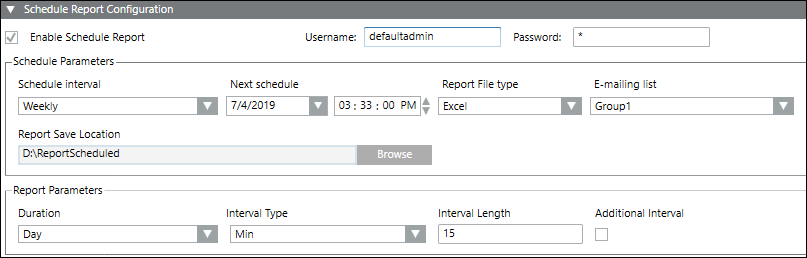
- Enable Schedule Report: Allows you to activate the configuration for routing the selected report to an email group or to a folder in the local memory.
- Username and Password: You have to enter the username and the password of the logged-in user to continue with the configurations.
- Schedule Interval: Allows you to select the interval for the routing of the report.
- Next schedule: Displays the date and time of the routing schedule. You can also select the scheduling date and time from this drop-down menu.
- Report File type: Allows you to select the format of the generated scheduled report. You can generate a report as either a .pdf or Excel file.
- E-mailing list: Allows you to select the email group to which the report will be routed.
- Report Save Location: Allows you to select the location of the folder in the local memory the report is routed to.
- Report Parameters: Allows you to configure the report parameters to be included in the scheduled report. The options include the following:
- Duration
- Interval Type
- Interval Length
- Additional Interval
- Chart Type
- Compare

NOTE:
The parameters in the Report Parameters section vary depending on the report type selected.
